- Blog
- Help
- About fragab
- Documentation
- Calendar iCal Feed
- Connect Calendar
- How to make a poll with URL parameters
- Create a poll
- Export polls
- Waiting list
- Share a poll via WhatsApp
- Troubleshooting
- Poll Types
Set up a waiting list for your poll
The course is full, but more people want to join? A fragab waiting list records their requests separately from confirmed places. A waiting-list entry does not yet confirm participation.
You need the Platin package and a participant limit. Writing “only three places” in the description does not enforce a limit: set the available capacity in the form too.
Set the capacity and enable the waiting list
- Describe the activity: create your poll with a clear title. Add the date, location and participation conditions once they are settled.
- Add options: create separate choices for courses or appointment slots.
- Limit places: enable the participant limit and check the capacity for each option. Three places per course is different from three people across the whole poll.
- Enable the waiting list: decide whether participants move up automatically. Review notifications, position display and whether waiting status is visible to others.
- Test before sharing: use a separate test poll to check both available and full options. Then share the participant link for your finished list.
For the basic process, see how to create a poll. The signup-list guide helps you explain the conditions clearly.
What participants see when an option is full
While places are available, a saved selection can confirm participation. Once the option is full and its waiting list is enabled, an extra selection is recorded as waiting. Participants select the option and save their entry.
Waiting status and position numbers are separate display settings. Choose whether people see their position and whether waiting status is also visible to others. Enable the latter if visitors should recognise waiting participants. If it is off, waiting entries can look like empty cells to other visitors.
Live example: three pottery places
In “Clay & Tea”, Mia, Lukas and Alex have the three confirmed places. Jana and Ben are waiting, shown by a clock beside their checkmarks. They do not have a confirmed place yet; the confirmed total remains three.
View the pottery-course waiting list
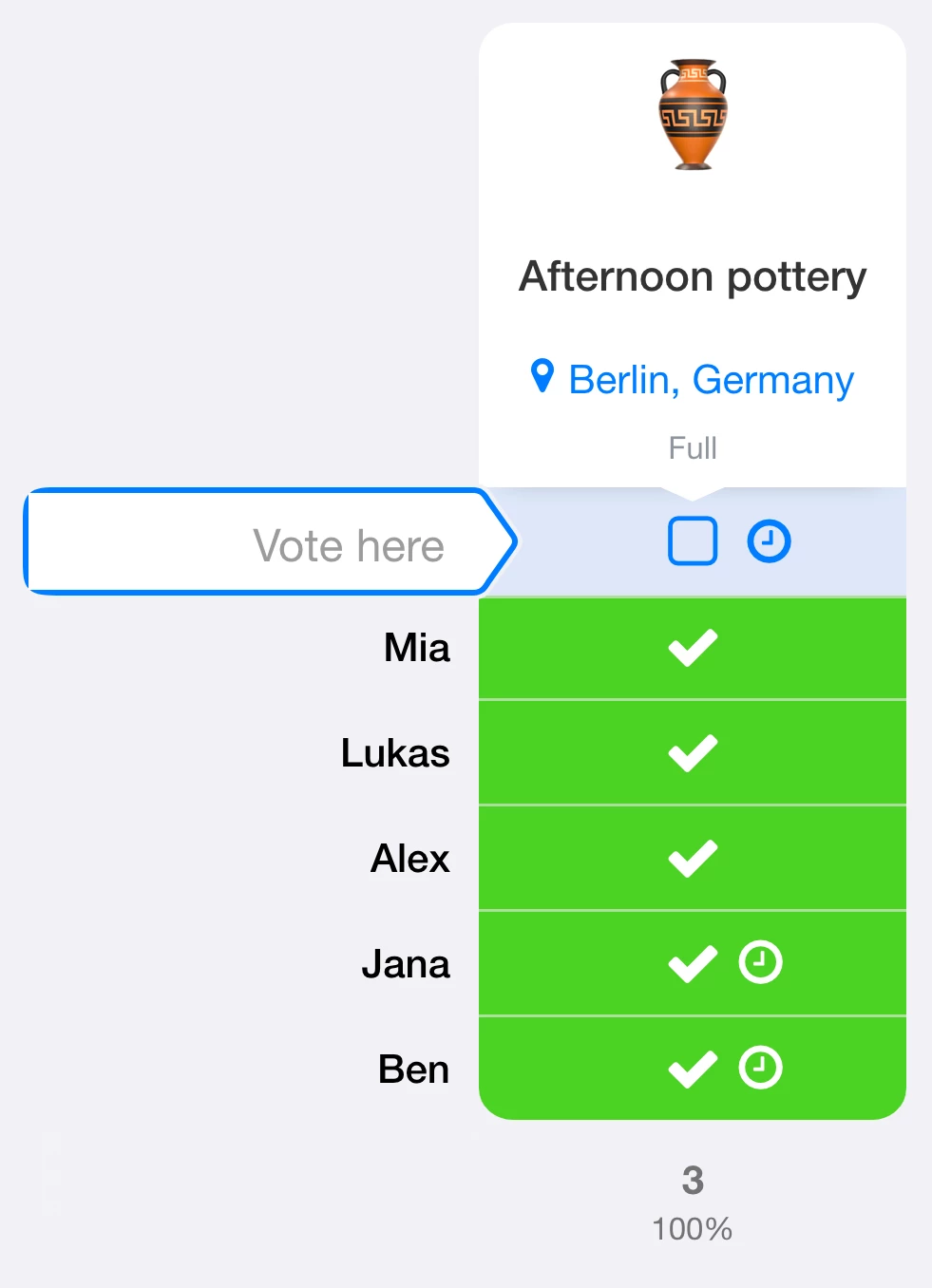
Try selecting the full option. This example stays open and interactive, but changes are not saved and its sample entries remain intact. Create your own list for your event.
Automatic or manual admission
With automatic moving up enabled, the queue is considered when a place becomes available. A person near the front can move up when enough places are free for their entry. If quantities are used, one waiting entry may need several places.
If you want to confirm participation yourself, leave automatic moving up off. As the creator, use the waiting entry’s menu to move it into a confirmed place once enough capacity is available. A cancellation alone does not confirm the next person in manual mode.
The protected example above does not allow changes to saved entries, so moving people up is not performed in that demo.
Agree how cancellations and updates work
Ask participants to change an RSVP they no longer need. A place is freed only when the change is saved. Decide whether to use the available notifications and tell your group how to recognise a confirmed place.
Email notifications can only be sent to an email address stored in the participant’s account. Do not rely on automatic email for guests without an account; agree another way to contact them.
Set up a private waiting list
Should other participants be unable to see who is waiting? Combine the waiting list with anonymous-poll settings. Hide other participants’ names, and hide their votes too if their choices should remain private.
Check waiting-status and position visibility separately: hiding waiting status alone does not hide names. Without the additional “Also for you and administrators” setting, the people managing the poll retain access to protected information. The privacy settings are included in Gold and Platin; the combination with a waiting list requires Platin.