- Blog
- Help
- Poll Types
- Anonymous polls
- Create with AI
- Events & Parties
- Find a date
- Volunteer list
- Parent-teacher appointments
- Potluck list
- Choose a restaurant
- Save the date
- Signup list
- Text - Multiple Choice
- Training attendance
- Yes/No polls
Find a date that works for your group
When can everyone make it? Once several people are involved, that simple question can turn into a long chat. A fragab scheduling poll puts your suggestions and the group’s answers in one place. You propose days and times, people select the options that work, and you decide when to meet.
Choose realistic dates and times
Start with a few dates you could actually organise. Three evenings may be enough for a game night; training sessions may need several days at a fixed time. Add an end time if people need to know how long to keep free.
For example, ask “When shall we meet for a game night?” and offer Friday at 19:00, Saturday at 19:00 and Sunday at 18:00. Use real date options, not dates written only in the description. People can then select every suitable appointment.
How a scheduling poll works
- Prepare the poll. Add a clear question, the important details and your suggested dates and times.
- Share the link. Save the poll and send its participant link by WhatsApp or email.
- Collect availability. Everyone selects the dates that work and saves their answers.
- Confirm the meeting. Compare the responses and tell the group which date you have chosen.
The poll creation guide explains the individual setup steps.
Live example: choose an evening for a game night
Five people have responded to three dates. Multiple choices are allowed. Each date has three yeses, so this example has no single winner: check who can attend and agree on the final plan together.
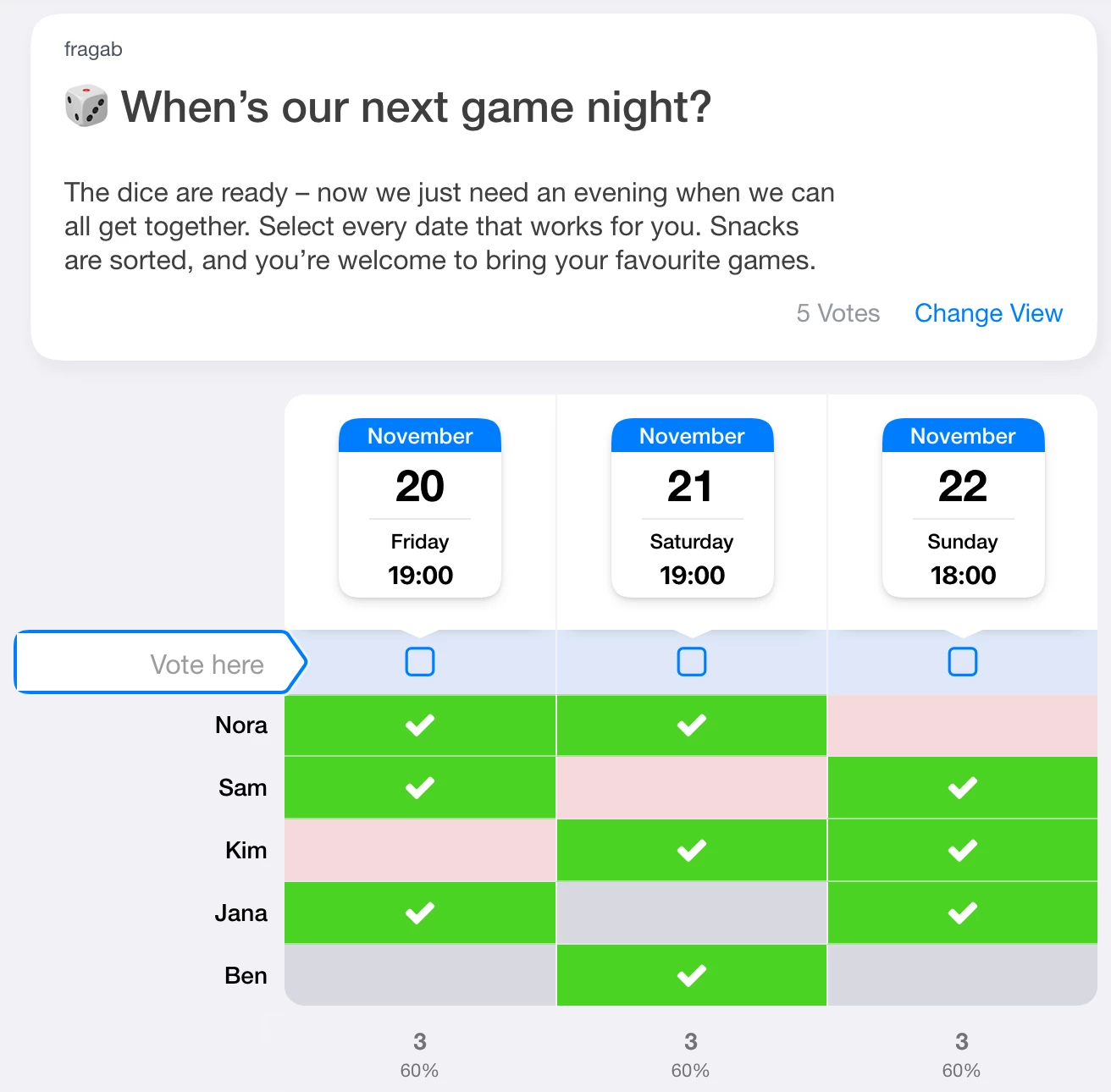
You can try selecting dates, but your changes are not saved. The live example moves its dates forward by whole weeks, keeping their weekdays and times. This screenshot shows 20–22 November 2026; it does not update automatically. Create a separate poll with the dates your own group needs.
Yes, No and Maybe mean different things
A yes means that the date works. If you enable “Maybe” votes, people can mark an option that is still uncertain. Ask those people before making a firm booking: a maybe is not a confirmed commitment.
Enable votes with “No” if you want people to explicitly rule out unsuitable dates. These are separate settings. The live game-night example uses yes selections only; it does not demonstrate the optional No and Maybe modes.
Compare your calendar or subscribe to dates
In the fragab app, you can connect your calendar to check proposed dates against existing appointments. You need calendar permission and the appropriate package. See connecting your calendar.
The personal calendar feed is a separate feature: it lets you subscribe to poll appointments in your calendar app. It does not replace the group’s availability vote.
What if no date works for everyone?
Look at the people behind the totals, not just the largest number. Is someone essential missing? Could a different start time help? If necessary, add another realistic date rather than a long list of unlikely choices.
Once you agree, send the group the final date, time and place. The poll helps you compare possibilities; it does not make the decision or reserve a venue for you.
If you need to keep availability private, check the separate settings for hidden names and votes before sharing the link. If the date is already fixed and you only need attendance responses, use a Yes/No poll instead.