- Blog
- Help
- Poll Types
- Anonymous polls
- Create with AI
- Events & Parties
- Find a date
- Volunteer list
- Parent-teacher appointments
- Potluck list
- Choose a restaurant
- Save the date
- Signup list
- Text - Multiple Choice
- Training attendance
- Yes/No polls
Create a volunteer list: who can help with each task?
The drinks stall has volunteers, but nobody has offered to set up. A fragab volunteer list collects replies for specific jobs, so your group can check the same list instead of searching through chat messages.
A volunteer list answers “Who will do what?”. If you need to choose the day first, start with a date poll. For food, drinks and equipment, use a potluck list.
Make the task, time and meeting point clear
“Drinks” is not a complete task. “Drinks stall, 2–4 pm, meet at the clubhouse” is easier to agree to. Explain any briefing and who volunteers should contact on the day.
- 🛠️ Setup: put out tables, 10–11 am.
- 🥤 Drinks stall: serve drinks, 2–4 pm.
- 🍰 Cake stall: sell cakes, 2–4 pm.
- 🧹 Clear up: tidy together from 6 pm.
Create separate options for shifts that must be filled independently. Times written in option text describe the shift; they do not automatically check whether someone has chosen overlapping jobs.
Set up your volunteer list
- Create a poll describing the event, location and contact person.
- Add each task and its time window as a text option.
- Check whether people may choose several tasks and whether each option needs a limit. Individual limits require Gold or Platin.
- Save the list and share its participant link with your volunteers.
- Ask everyone to save their choices and check the gaps together before the event.
Live example: volunteers for a club fair
Five sample entries show the task choices. Setup and clearing up each have two places, both taken. The drinks stall has one of two places filled; the cake stall has one of three. Ben helps with both setup and clearing up, so five people have made six selections.
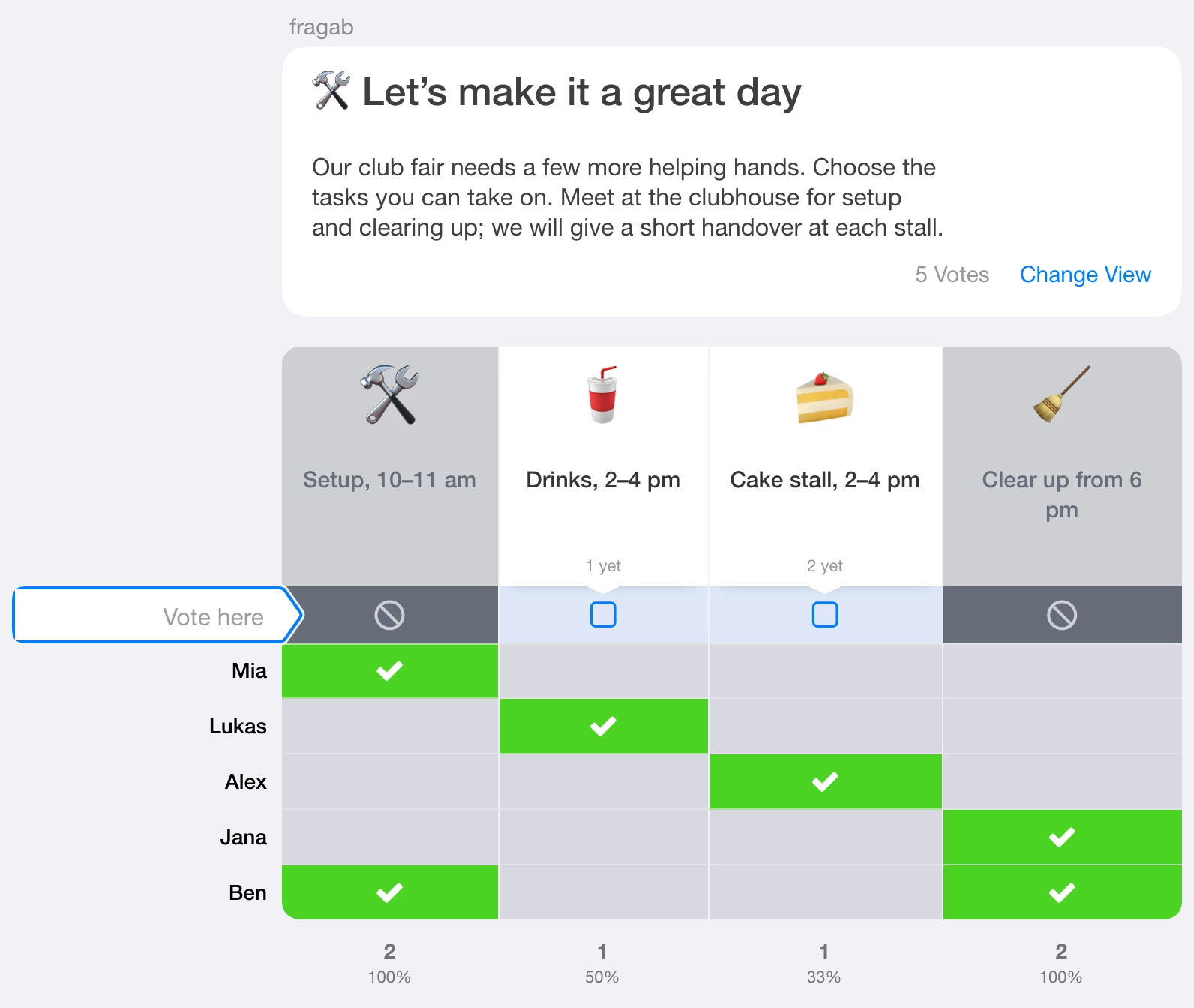
The example stays open and interactive. Try a choice; changes are not saved. It shows ordinary signup limits without a waiting list. Create your own poll for your group.
Check cancellations and uncovered shifts
Popular jobs do not fill the other shifts. Ask for replacements where needed and keep changes in the same list. Confirm that everyone understands the handover. A list does not replace a briefing or the organisers’ responsibility.
The creation guide explains the form.
Waiting lists and private signups
For full shifts, you can offer a waiting list for volunteers. Decide separately whether people move up automatically or you assign free places yourself. Waiting lists require Platin.
If volunteers should not see each other’s replies, use the settings for private signups. Hide other participants’ names and choices separately. These Gold/Platin settings can be combined with a waiting list; check waiting-status and position visibility too. Without “Also for you and administrators”, administrators can still see the protected information.